
A wedding day ends with 3,000 photos on two cards, a laptop at 12% battery and venue Wi-Fi that drops every few minutes. The couple’s family wants photos tonight. Uploading through a browser means keeping a tab open for hours and starting again when it fails. Wedza Gallery, the desktop app for Wedza CRM’s Cloud Gallery, does it for you: photos go from your camera, card or SSD to your client’s gallery by themselves.
Three ways photos reach the gallery
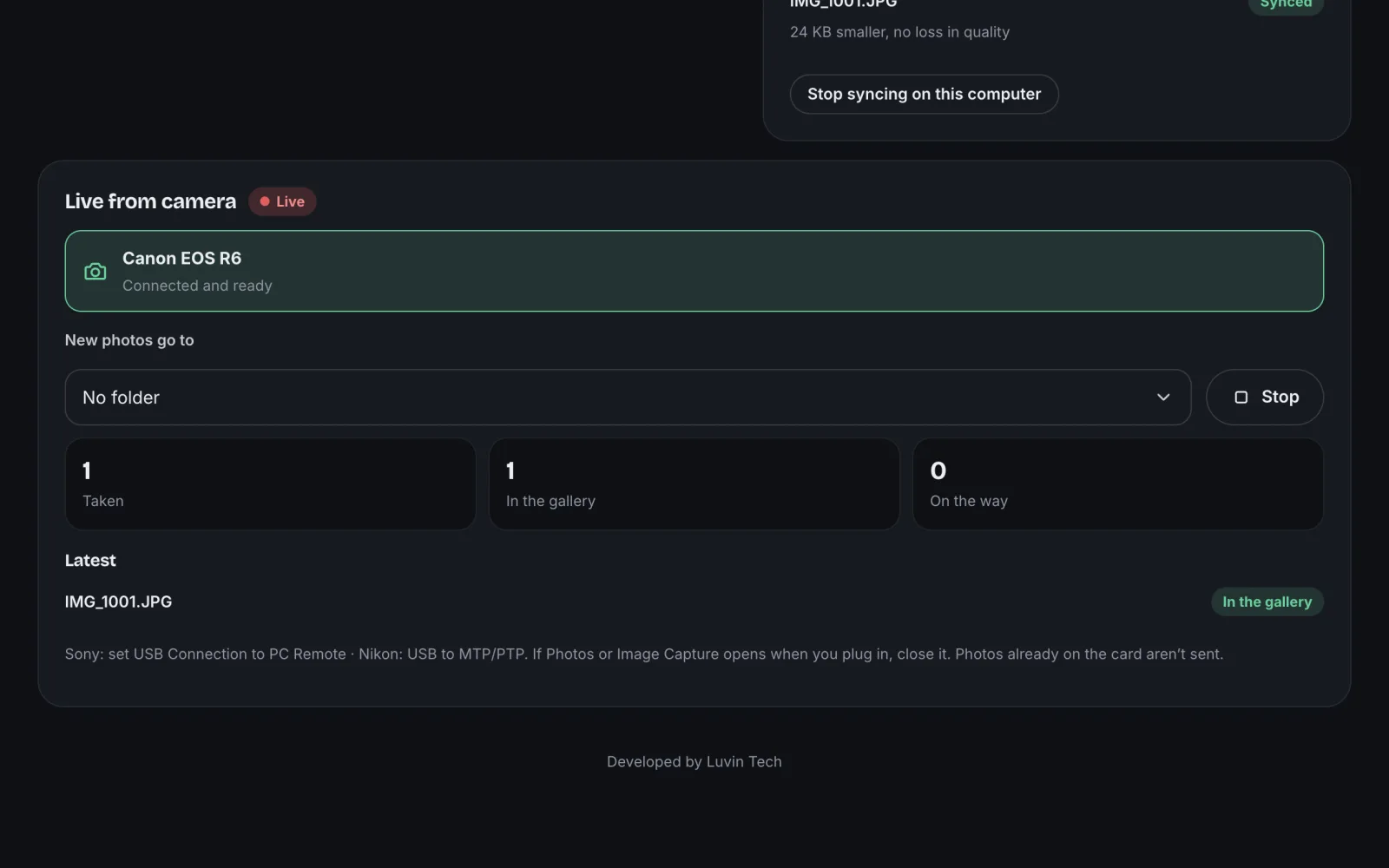
- Live from camera. Plug your camera into the Mac by USB, open the gallery and press Start live upload. Every new photo goes to the gallery as you take it. You see Taken, In the gallery and On the way counted live, and choose which gallery folder (Haldi, Wedding, Reception) new photos go to.
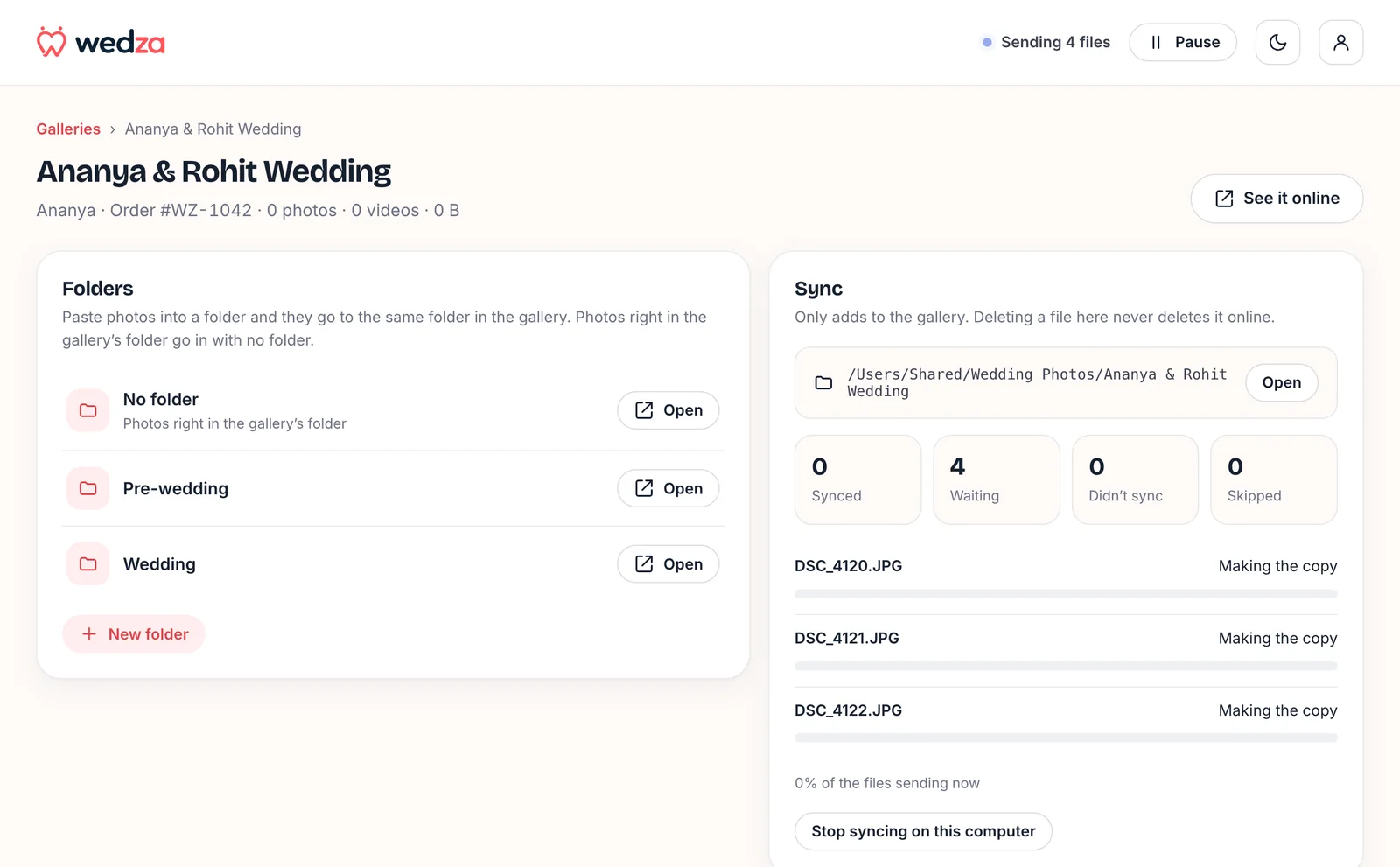
- Copy from a card or SSD. Copy photos into the gallery’s folder on your computer. Wedza Gallery waits until the copy is finished, then sends each photo.
- Export from your editor. Export edited photos from Lightroom or any editor into the same folder. They go up on their own, into the matching gallery folder.
Can I upload photos live from my camera?
On a Mac, Wedza Gallery talks to the camera itself, with no driver to install. Canon, Nikon, Sony, Fujifilm, Panasonic and other cameras that connect by USB work. A copy of every photo stays in the gallery’s folder on your computer, so nothing depends on the internet at the moment you shoot.
- Sony: set USB Connection to PC Remote.
- Nikon: set USB to MTP/PTP.
- If Photos or Image Capture opens when you plug in, close it.
- Photos already on the card are not sent live; copy those into the folder.
On Windows, built-in live upload is coming. Today, set your camera’s own tether software (Canon EOS Utility, Nikon NX Tether, Sony Imaging Edge, Fujifilm X Acquire, LUMIX Tether) to save into the gallery’s folder, and every photo goes up by itself.
How do I upload event photos on slow venue internet?
- Waits, then carries on. When the internet drops, the app waits and continues when it is back. No failed uploads to start again.
- Survives a restart. Close the laptop, drive home, open it again: it picks up where it stopped.
- Videos in parts. Videos up to 2 GB go up in parts, and a dropped part is sent again, not the whole video.
- Never twice. It remembers what it sent. Files already in the gallery are skipped, even when you link the gallery again.
- Smaller files go faster. With Compressed, each photo goes up at full size with no loss in quality as a much smaller file, so the same internet sends far more photos.
Cards, SSDs and hard disks
Choose where each gallery lives: your laptop, an SSD or a hard disk. Wedza Gallery makes a folder for the gallery there, with a folder inside for each gallery folder. A new sub-folder you make on your computer becomes a new tab in your client’s gallery. Unplug the SSD and the gallery pauses; plug it back in and it carries on.
Should I upload compressed or original files?
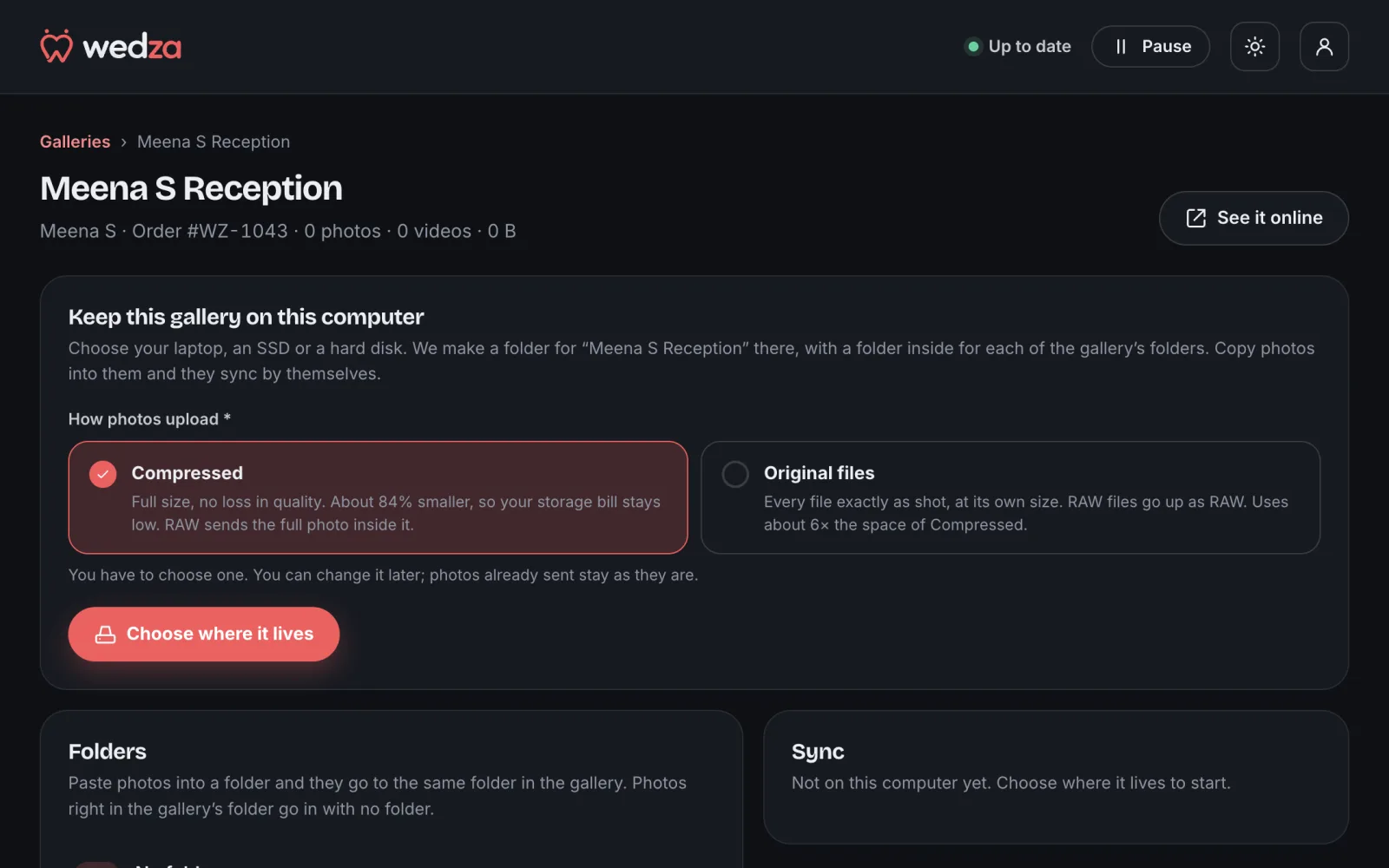
Every gallery asks how photos upload, and nothing syncs until you choose:
- Compressed: full size, no loss in quality, and much smaller, so your storage bill stays low. For a RAW file, it sends the full photo the camera keeps inside it.
- Original files: every file exactly as shot, at its own size. RAW files (CR2, CR3, NEF, ARW, RAF, DNG and more) go up as RAW; your client sees a preview and downloads the RAW. Uses about 6 times the space.
You can change it later. New photos use the new choice; photos already sent stay as they are.
Safe by design
- It only adds. Deleting a file on your computer never deletes it from the gallery.
- Private storage. Galleries are stored encrypted on Cloudflare R2. Your client opens theirs with a link, a password and an expiry date you set.
- Updates by itself. New versions download in the background and ask you to restart, never while photos are sending or live upload is on.
From the gallery to delivery
The gallery belongs to the order in Wedza CRM, next to its quote, payments, crew and Deliverables. Your client gets one link with a tab for each folder, downloads and album picks. Turn on FaceFind AI and every guest finds their own photos with a face scan.
Price
The app costs nothing extra. It comes with Cloud Gallery: ₹199 for the first 30 days (up to 30 GB), then ₹6 per GB every 30 days for what you store. Cloud Gallery works on top of a Wedza CRM plan, which is ₹199 for 30 days with every feature. See Wedza pricing.
Get Wedza Gallery
Log in to the Wedza Partner Portal, open CRM › Gallery and download Wedza Gallery for Mac (Apple chip or Intel) or Windows. See every screen on how Wedza Gallery works, or book a call with the Wedza team and we set it up with you.
More about Wedza CRM: this guide covers one part. For everything Wedza CRM does, with real screens, prices and add-ons, see Wedza CRM features: everything it does.
Questions
Can Wedza Gallery upload straight from my camera?
Yes, on a Mac. Plug the camera in with its USB cable, open the gallery in Wedza Gallery and press Start live upload. Every new photo goes to the gallery as you take it, and a copy stays in the gallery’s folder on your computer. On Windows, set your camera’s own tether software to save into the gallery’s folder and every photo goes up by itself.
Which cameras work with Live from camera?
Cameras that connect to a Mac by USB, such as Canon, Nikon, Sony, Fujifilm and Panasonic. Sony: set USB Connection to PC Remote. Nikon: set USB to MTP/PTP. If Photos or Image Capture opens when you plug in, close it.
What happens if the venue internet is slow or drops?
Wedza Gallery waits and carries on when the internet comes back. It picks up again after a restart, sends videos in parts so a dropped part is sent again, and never sends the same file twice. Your photos are safe in the folder on your computer the whole time.
Can I copy from a memory card or an SSD?
Yes. Copy from the card or an SSD into the gallery’s folder, or keep the whole gallery on an SSD or hard disk. The app waits until copying is finished before it sends, and pauses while the drive is unplugged.
Compressed or Original files: which should I pick?
Compressed sends every photo at full size with no loss in quality as a much smaller file, so clients open photos fast and your storage bill stays low. Original files sends every file exactly as shot, RAW as RAW, and uses about 6 times the space. You choose per gallery and can change it later.
Does deleting a photo on my laptop delete it from the gallery?
No. Wedza Gallery only adds to the gallery. Delete files on your computer to free space and your client’s gallery stays as it is.
How much does Wedza Gallery cost?
The app costs nothing extra. It comes with Cloud Gallery in Wedza CRM: ₹199 for the first 30 days (up to 30 GB), then ₹6 per GB every 30 days for what you store.