
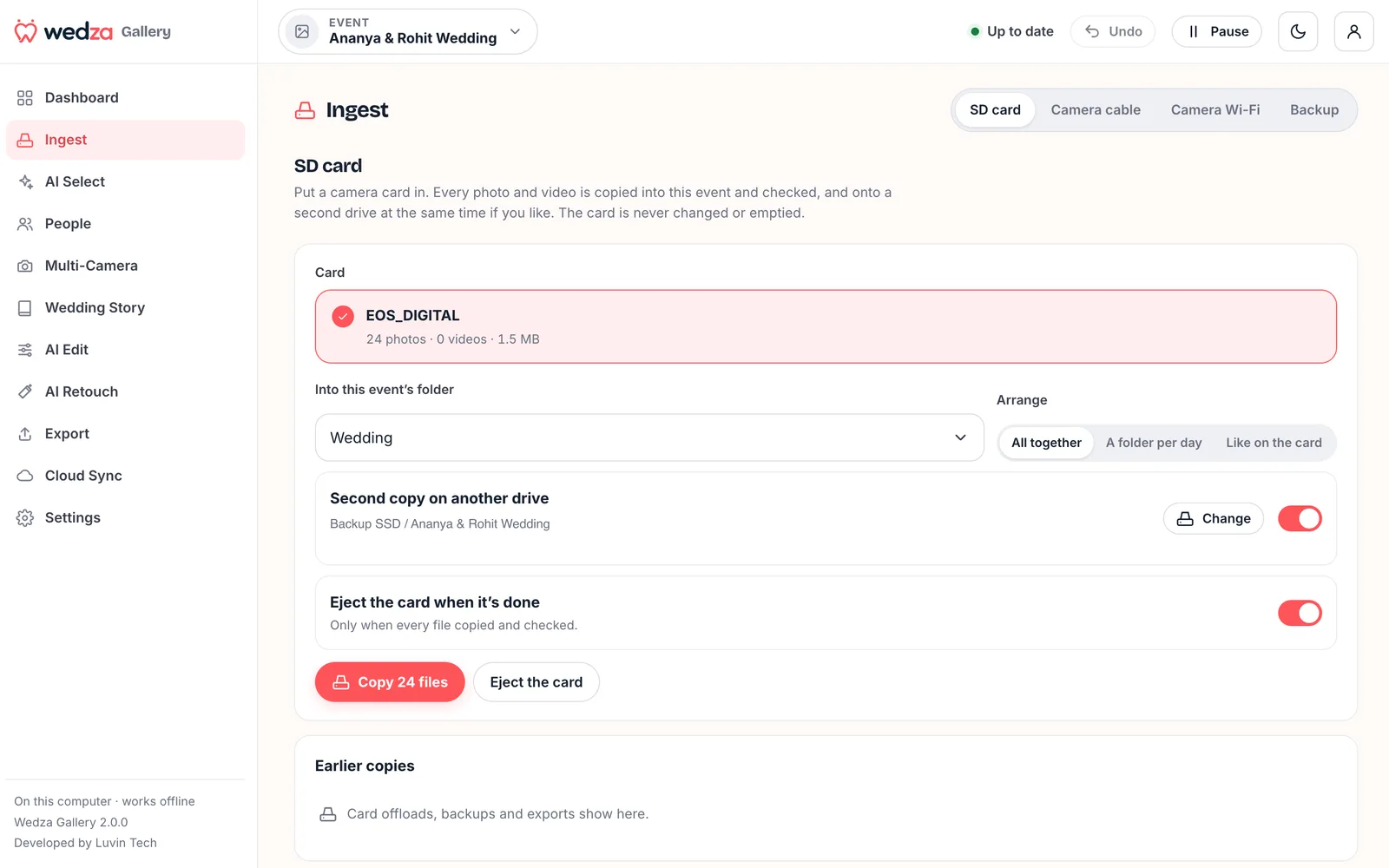
Every wedding photographer’s fear is a card that dies before the photos are copied. The fix is simple but tiring at 2 AM: copy, check, copy again. Ingest in Wedza Gallery does all three in one press.
What is the right backup rule for wedding photos?
- Copy 1: the event folder on your laptop or working SSD.
- Copy 2: a second drive, made at the same time.
- Copy 3: away from the others, for example the client’s online gallery or a drive kept at home.
- Keep the card as it is until all copies are made and checked.
How does Wedza Gallery back up an SD card?
- Put the card in. Any card or drive with a camera DCIM folder shows up.
- Choose the event and how to arrange it: all together, a folder per day or like on the card.
- Second copy on another drive: switch it on and pick the backup drive. It warns you if the backup is on the same drive as the event.
- Copy. Every photo and video is copied, read back and checked. Running it again skips what is there.
- Eject the card when it’s done, only when every file is copied and checked.
Backup in the same place copies the whole event to another drive later, checked file by file. It adds and updates; it never deletes.
Can an online gallery be a backup copy?
Cloud Sync sends the folders you choose to the client’s Cloud Gallery, compressed or as original files, RAW included, and keeps going on slow venue internet. Read how syncing works. Shooting tethered instead? Camera cable and Camera Wi-Fi bring photos in as you shoot, with a copy on your computer.
Price
Wedza Gallery costs nothing extra. It comes with Cloud Gallery in Wedza CRM: ₹199 for the first 30 days (up to 30 GB), then ₹6 per GB every 30 days for what you store.
More about Wedza CRM: this guide covers one part. For everything Wedza CRM does, with real screens, prices and add-ons, see Wedza CRM features: everything it does.
Questions
How should a wedding photographer back up photos?
Keep at least three copies on two different kinds of storage, with one away from the others: the camera card until delivery, the laptop or working drive, a second drive, and an online copy. Check each copy, and never format a card until it is copied twice.
Does Wedza Gallery check the copy?
Yes. Every file is read back after copying and checked against the card, and a second copy can go to a backup drive at the same time. Running it again skips what is already there.
Will it delete or format my card?
No. The card is never changed or emptied. It is ejected only when every file has been copied and checked, if you switch that on.
Can the online gallery be a backup?
Cloud Sync sends the folders you choose to your client’s Cloud Gallery as compressed or original files, RAW included, so it can be one of your copies. Wedza Gallery only adds online: deleting on your computer never deletes online.
Does it work with any card?
Any card or drive with a camera DCIM folder, from any camera.